
How to track landing page leads with UTM parameters
UTM parameters are labels added to a campaign URL. They help you identify which source, channel, campaign, and creative produced a visit or lead without creating a separate landing page for every placement.
Use them for values such as linkedin, paid_social, and consultation_launch. Never put an email address, customer name, or other sensitive information in a URL.
1. Understand the five common parameters
| Parameter | Purpose | Example |
|---|---|---|
utm_source | Platform, publisher, or list | linkedin |
utm_medium | Marketing channel | paid_social |
utm_campaign | Shared campaign name | consultation_launch |
utm_content | Creative, placement, or variation | founder_video |
utm_term | Keyword or audience label when useful | agency_owners |
2. Create a naming convention first
Choose lowercase names, use underscores consistently, and keep a small reference sheet for recurring campaigns. Inconsistent values such as LinkedIn, linkedin.com, and li fragment what should be one source.
Use campaign names that remain understandable later. consultation_launch is more useful than july_test_2 when you review an export months afterward.
| Channel | utm_source | utm_medium | utm_campaign |
|---|---|---|---|
| LinkedIn ad | paid_social | consultation_launch | |
| Newsletter | newsletter | consultation_launch | |
| Partner link | partner_name | referral | consultation_launch |
3. Build the tagged landing-page URL
Start with the published QuickPages page and add the parameters after a question mark. Separate each additional value with an ampersand:
https://qkpage2.co/p/consultation-request
?utm_source=linkedin
&utm_medium=paid_social
&utm_campaign=consultation_launch
&utm_content=founder_video
Keep the untagged page URL for normal sharing. Use a tagged version in each ad, email, partner placement, or social campaign that needs separate attribution.
4. Test the URL before launching
Open the complete tagged URL in a fresh browser window. Confirm that the page loads normally and that the visible URL still contains the expected values. Submit a test lead using an address you control.
If another system redirects to QuickPages first, confirm that it preserves the query string. Some link shorteners, redirect rules, and tracking systems can remove or rewrite parameters.
5. Review source in the lead inbox
QuickPages stores the landing URL and reads the standard UTM parameters when a lead converts. The lead inbox displays the source and campaign beside the submission, making it possible to compare lead quality as well as volume.
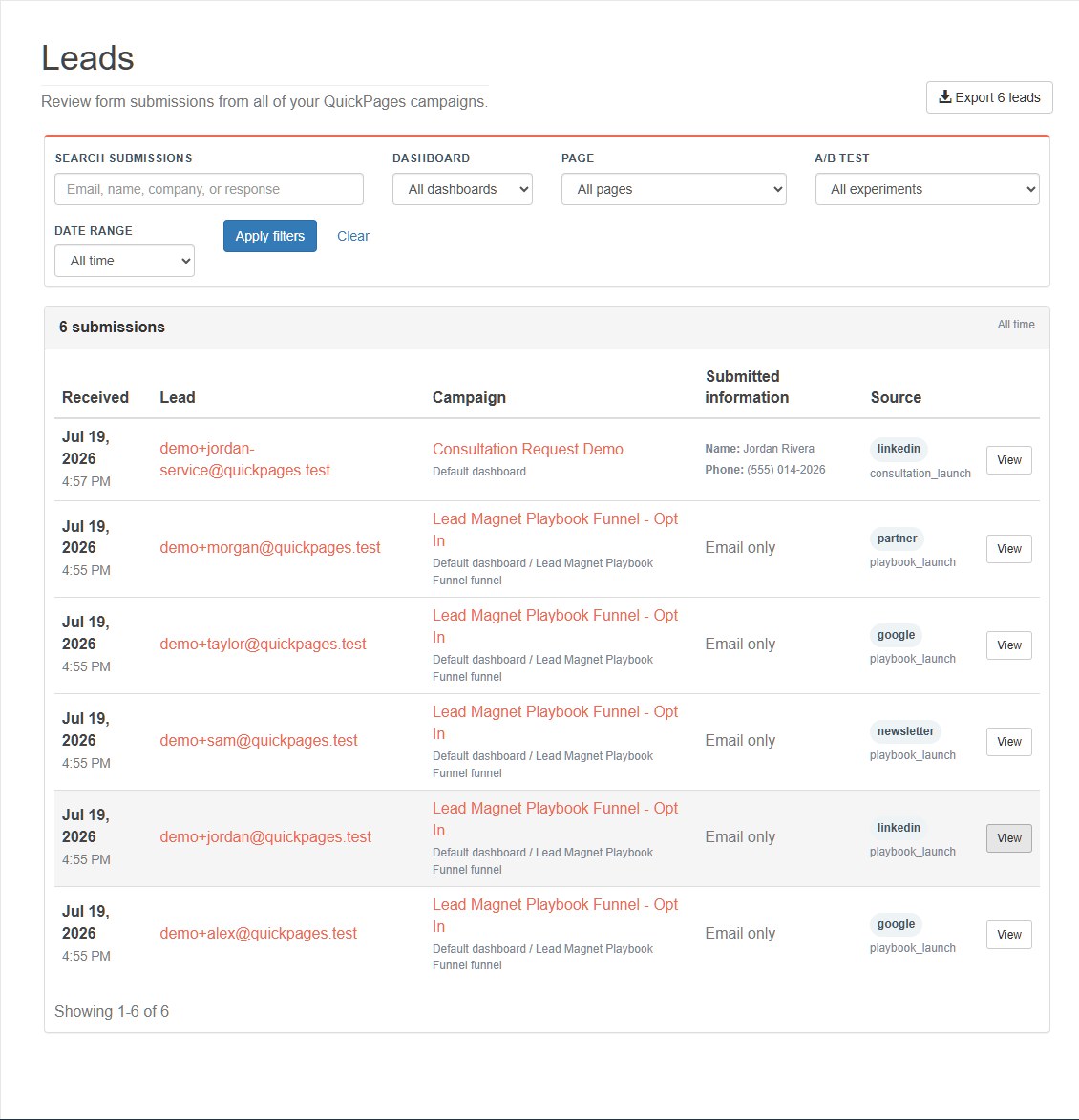
6. Open a lead for the complete context
The detailed view can show the source, medium, campaign, content label, referrer, and complete landing URL when those values were captured. This makes it easier to debug an unexpected source or confirm that a specific creative generated the request.
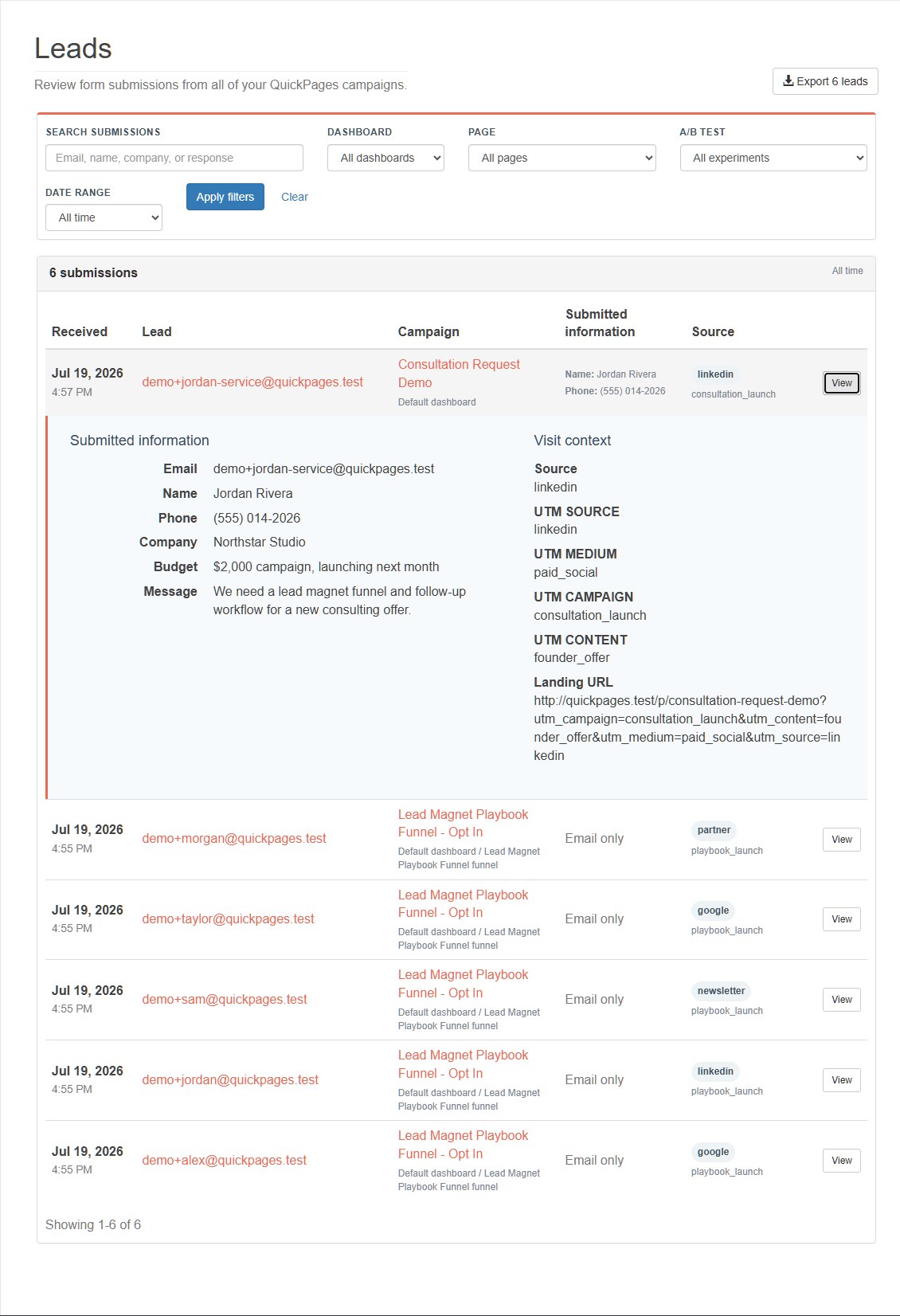
7. Filter and export with context
Filter the inbox by dashboard, page, A/B test, search term, or date range before exporting. The lead CSV includes dedicated utm_source, utm_medium, utm_campaign, utm_content, and utm_term columns alongside the referrer and complete landing URL.
Keep the reporting period with the export. Comparing a seven-day launch file to an all-time file without noting the date window can produce misleading conclusions.
8. Send the same source context through webhooks
Conversion webhooks include a source object so Zapier or a custom endpoint can store attribution with the contact:
"source": {
  "label": "linkedin",
  "utm_source": "linkedin",
  "utm_medium": "paid_social",
  "utm_campaign": "consultation_launch",
  "utm_content": "founder_video",
  "utm_term": "",
  "referrer": "https://www.linkedin.com/",
  "landing_url": "https://qkpage2.co/p/consultation-request?..."
}
Map these values into dedicated CRM or spreadsheet columns rather than combining them into one notes field. The Zapier guide shows the complete webhook payload and test workflow.
9. Use attribution as directional evidence
UTM values are useful but not perfect. Visitors can remove parameters, share tagged links, switch devices, block storage, or return later through another route. Treat the captured source as evidence about the converting visit, not a complete multi-touch customer journey.
For high-stakes advertising decisions, compare QuickPages leads with the ad platform, analytics system, CRM, and actual customer outcomes.
10. Avoid common UTM mistakes
- Do not put personal or confidential data in query parameters.
- Do not use different spellings for the same source.
- Do not tag internal navigation links; that can overwrite the original campaign context.
- Do not create a new campaign name for every minor creative variation; use
utm_content. - Do not launch without submitting one lead through the final tagged URL.
Know where useful leads came from
Adopt one naming convention, tag each distribution channel, and verify the source in QuickPages before the campaign goes live.
Start tracking leads