
How to A/B test a landing page without resetting its analytics
An A/B test should answer a new question without erasing what happened before the experiment. In QuickPages, the underlying pages continue to collect their own views and conversions while the A/B test report measures only traffic that entered through the shared experiment URL.
This separation lets you compare variants fairly and still open either page later to review its complete history.
Page statistics include activity on the page itself, including activity before or outside the experiment. A/B test statistics include only visits distributed through the shared test URL.
1. Start with a clear hypothesis
Do not create a second version simply because the first page feels old. Write down the decision the test should inform. Good hypotheses compare one meaningful difference:
- A specific outcome headline versus a headline that names the problem.
- A short form versus a form with one qualifying field.
- Case-study proof versus a benefits checklist.
- A direct call to action versus a lower-commitment invitation.
If the variants change the offer, layout, form, and destination at the same time, a winner will not tell you which change mattered.
2. Duplicate the page as an A/B variant
Open the existing page settings and choose Duplicate as A/B Variant. QuickPages creates a new published page with a safe unique name and URL, copies its design and settings, and opens the A/B test setup with both pages already selected.
The copy does not inherit the original page's traffic, leads, or previous A/B test membership. Edit the duplicated page and make the one change your hypothesis requires.
3. Create the shared experiment URL
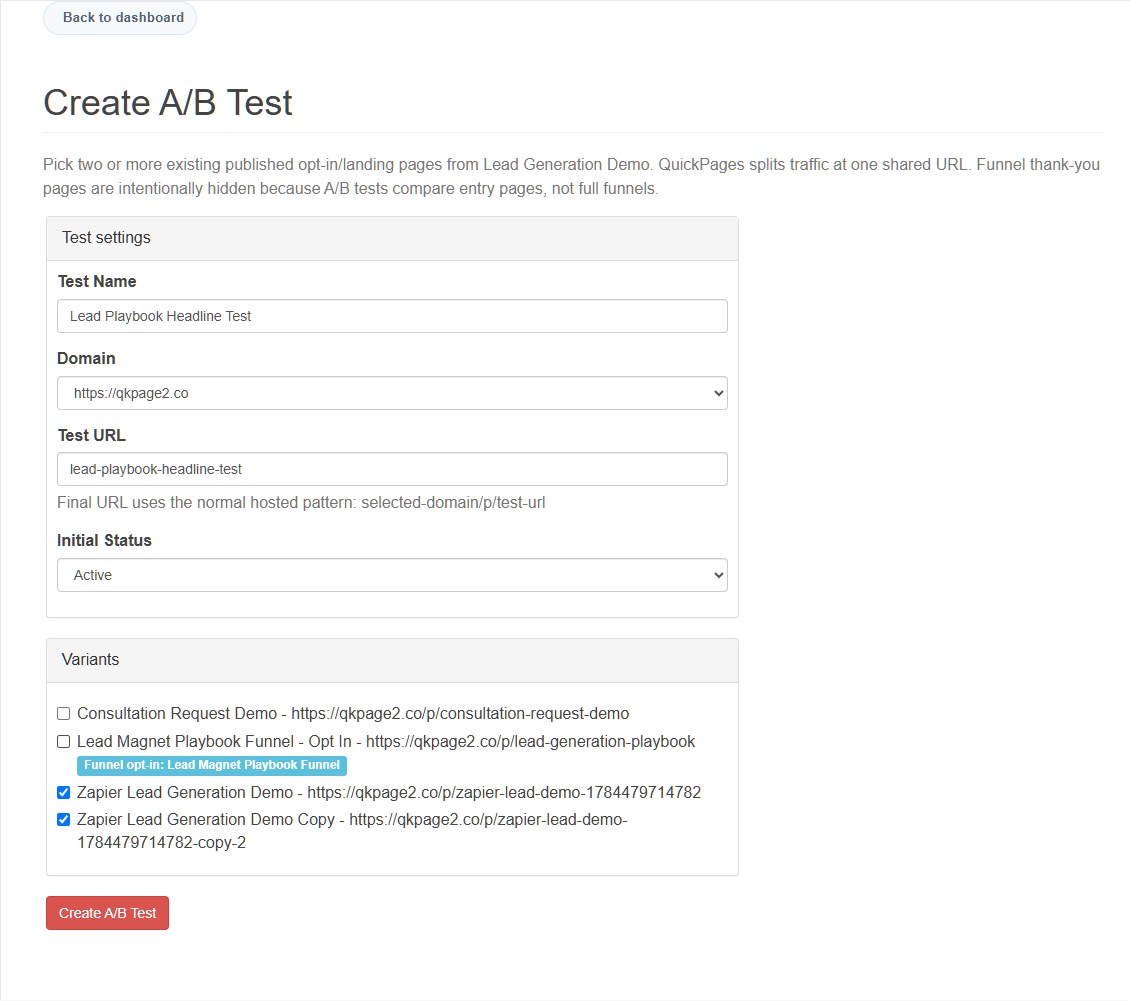
Give the experiment a recognizable internal name, choose the publishing domain, and enter a short test link name. Select at least two eligible published entry pages and set the initial status to active when you are ready to distribute traffic.
4. Send all experiment traffic to one address
Use the shared experiment URL in ads, emails, social posts, and campaign links. QuickPages assigns visitors to active variants and keeps them on the selected version during the experiment.
Do not split campaign links manually between the individual page URLs. Direct visits still count on each page, but they are intentionally excluded from the A/B test comparison because QuickPages did not distribute that traffic.
5. Read visitor and conversion metrics separately
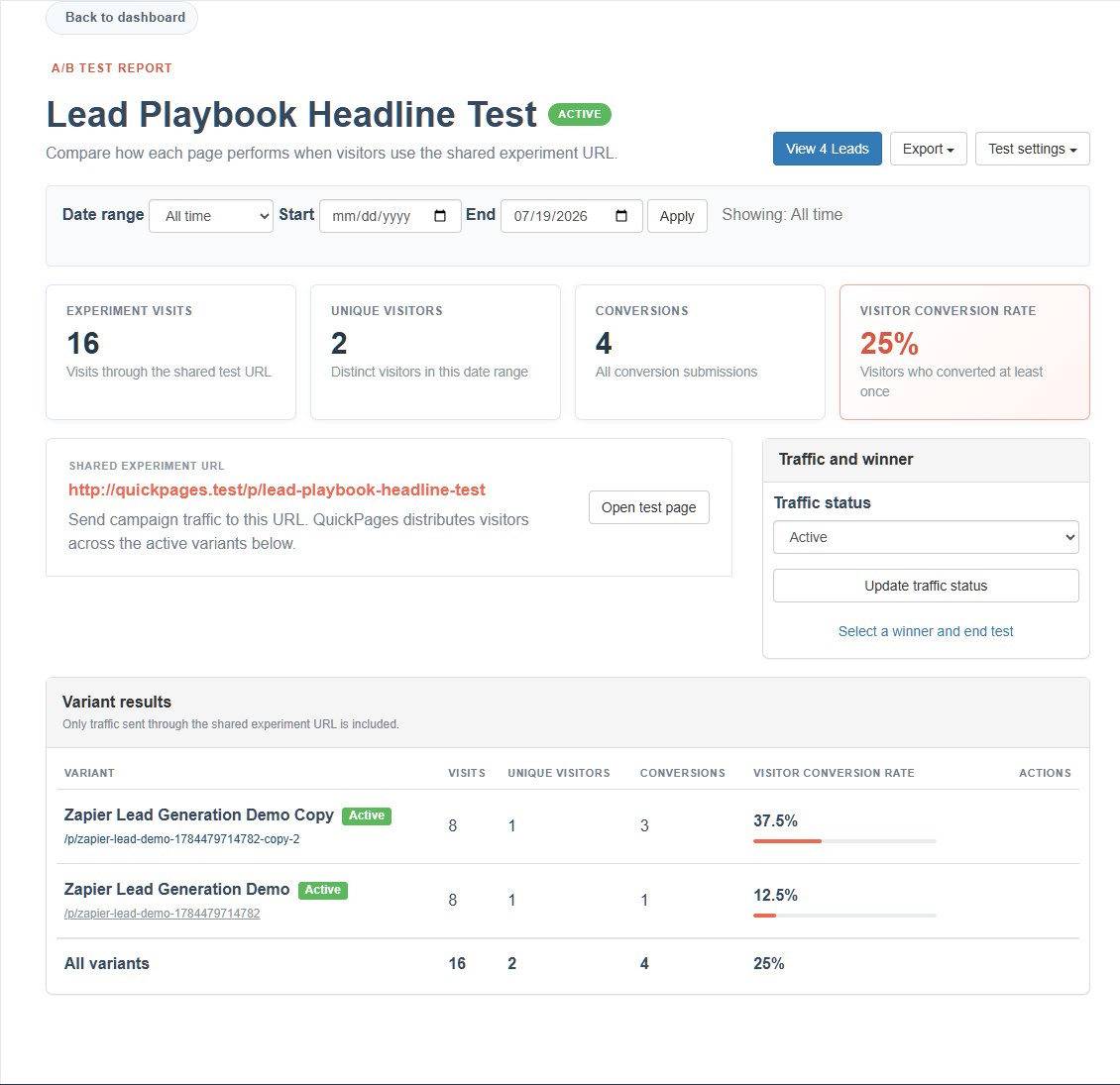
The report shows experiment visits, estimated visitors, submissions, visitor conversion rate, and submission rate. One visitor can submit more than once, so QuickPages preserves both facts:
- Submissions count recorded form submissions or direct-provider submission attempts.
- Estimated visitors uses an anonymous rotating visitor key for new traffic and legacy IP-based grouping for older events. It is an estimate, not an identity count.
- Visitor conversion rate is the share of estimated visitors who submitted at least once.
Use the variant table to compare traffic allocation and results. A variant with little traffic should not be declared a winner simply because one early visitor converted.
6. Review the actual leads, not only totals
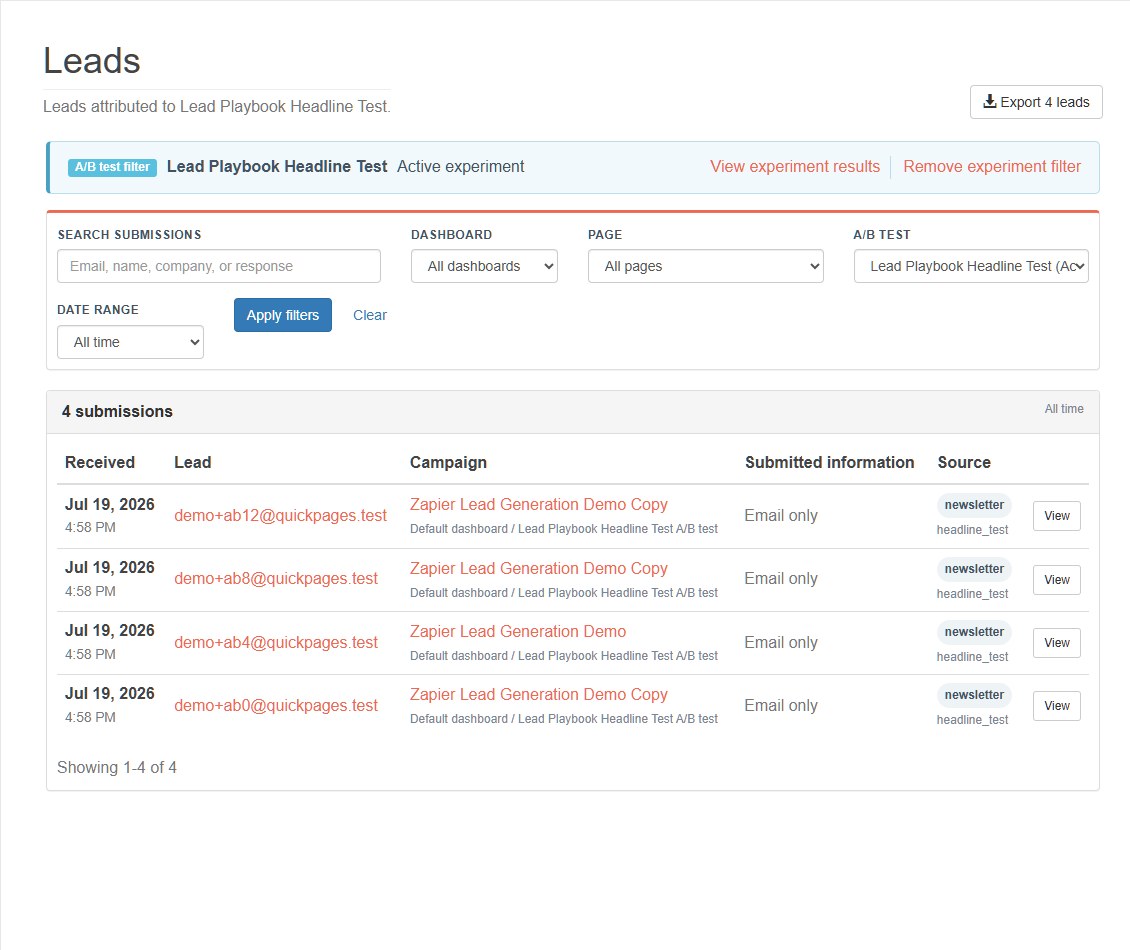
Click View Leads to open the lead inbox with the A/B test filter clearly displayed. This is where you can inspect the people and submitted fields behind the conversion totals.
The experiment's statistics CSV contains variant totals. The lead inbox export contains individual submissions. Choose the lead export when you need email addresses, form answers, source details, or a client handoff.
7. Wait for a decision-quality result
There is no universal number of visits that makes every test conclusive. The required sample depends on the normal conversion rate and the size of the difference you care about. As a practical rule, do not stop after a few conversions or after checking repeatedly for whichever version is temporarily ahead.
Also review lead quality. A shorter form may increase submissions while producing fewer qualified conversations. The winning variant should improve the business outcome, not merely the easiest metric.
Variant A receives 420 tracked visitors and 38 converting visitors (9.0%). Variant B receives 415 visitors and 51 converting visitors (12.3%). That difference is worth investigating, but the decision should also consider whether the leads are comparable and whether the result remains stable as more traffic arrives. QuickPages reports the result; it does not manufacture statistical certainty from a small sample.
Do not start an A/B test when the page has almost no traffic, when a destination is broken, or when the variants change several unrelated ideas at once. Fix technical problems directly and use testing for a specific decision that future traffic can answer.
8. Pause or end the experiment deliberately
Pause traffic when a variant is broken or when the campaign is temporarily stopped. When the test has answered the question, select a winner and end it. The shared URL can then route visitors to the winning page.
Deleting an A/B test soft-deletes the experiment relationship and report; it does not silently destroy the pages. QuickPages also prevents deleting a page while it belongs to an active test, so the experiment cannot be left with a missing variant.
Use the reporting guide when you need individual leads rather than variant totals, and the UTM guide to keep acquisition context attached to those conversions.
Run a test that teaches you something
Start from an existing page, duplicate it as a variant, change one meaningful idea, and send the next campaign through the shared URL.
Create a QuickPages account